
Remove & Add Watermark
4.7Rating
Jul 19, 2024Latest update
3.3-Lite-LiteENVersion
About Remove & Add Watermark
This app can be used to remove or add watermark to images and videos.
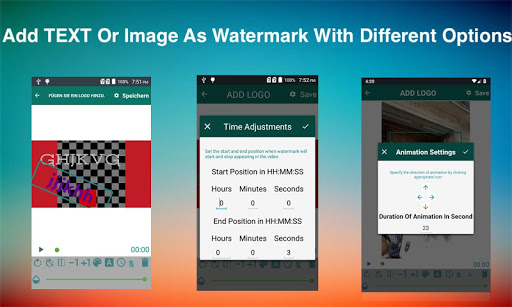
You can add watermark to images/videos using text and images with different options including animating the watermark.
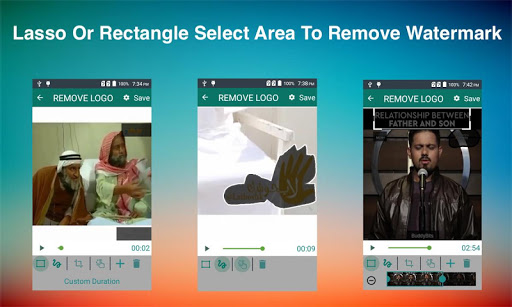
You can also suppress a watermark by selecting its area(lasso or rectangle select) and app can remove it by interpolation of the surrounding pixels.This technique works almost perfectly on alpha-blend watermarks, or you can crop the region outside of watermark area, this works perfectly for media that has logo at edges.
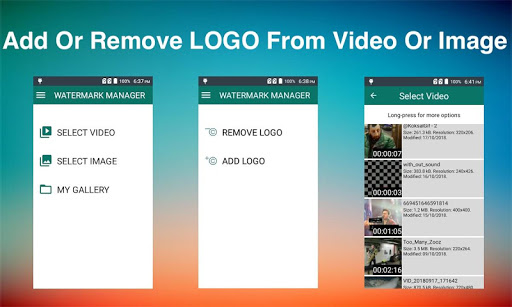
✔As soon as you start the app it show you option to select image or video
✔After selection you are asked if you want to remove or add the watermark
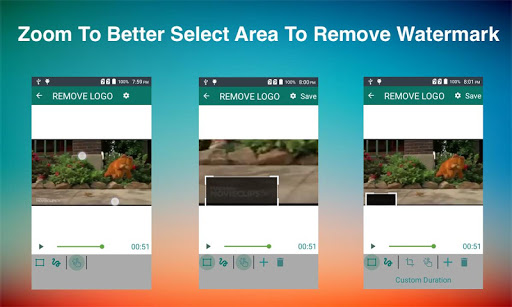
✔If you select REMOVE LOGO option then you are taken to screen with preview and adjustable rectangle with actions(specify more than 1 areas) to specify the area of logo, in this screen can also click on Custom Duration button to specify duration for which to apply filter.You can also choose zoom option and pinch with fingers to better select small watermark area.
✔If you select ADD LOGO option then you are taken to screen with options to add text or images, here you can also customise each option, like change font, text,
colour, size or rotation.
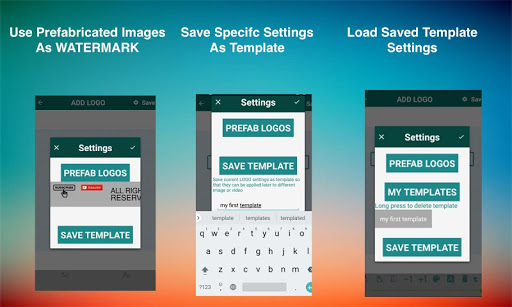
✔ You can also use prefabricated images as watermarks or can save your specific settings as template, these templates can be applied to a different image or video later using 'saved template' option.
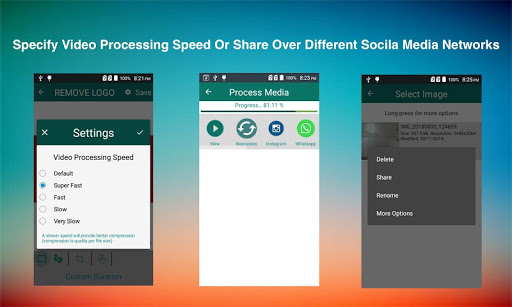
✔Press Save button and wait for process to complete and view or share the results.
All exports are saved in WATERMARK MANAGER folder in SD card root directory.You can also view the processed files using 'My Gallery' screen
Copy font files(.ttf) into WATERMARK MANAGER->.fonts directory and app will pick those fonts from there.
Select the watermark you want to animate & click the A button in bottom bar & define settings e.g., duration & direction of watermark.
In edit screen(where you specify watermark area and other components) there is a gear icon on top right corner, please use slowest speed you have patience for and video quality will improve.
After defining all logo settings(images, texts) click on top-right gear icon to open settings screen and then click "Save Template"->Give template name and you are done.
These are images that comes with app and can be added as watermarks, these can be loaded from settings screen.
Use add (+) action button at the bottom bar to specify another watermark area.
Mainly Mp4 but your video is any other format then it is trans-coded to mp4.
You can add watermark to images/videos using text and images with different options including animating the watermark.
You can also suppress a watermark by selecting its area(lasso or rectangle select) and app can remove it by interpolation of the surrounding pixels.This technique works almost perfectly on alpha-blend watermarks, or you can crop the region outside of watermark area, this works perfectly for media that has logo at edges.
HOW TO USE
✔As soon as you start the app it show you option to select image or video
✔After selection you are asked if you want to remove or add the watermark
✔If you select REMOVE LOGO option then you are taken to screen with preview and adjustable rectangle with actions(specify more than 1 areas) to specify the area of logo, in this screen can also click on Custom Duration button to specify duration for which to apply filter.You can also choose zoom option and pinch with fingers to better select small watermark area.
✔If you select ADD LOGO option then you are taken to screen with options to add text or images, here you can also customise each option, like change font, text,
colour, size or rotation.
✔ You can also use prefabricated images as watermarks or can save your specific settings as template, these templates can be applied to a different image or video later using 'saved template' option.
✔Press Save button and wait for process to complete and view or share the results.
All exports are saved in WATERMARK MANAGER folder in SD card root directory.You can also view the processed files using 'My Gallery' screen
FAQS
How to add more fonts
Copy font files(.ttf) into WATERMARK MANAGER->.fonts directory and app will pick those fonts from there.
How to animate watermark
Select the watermark you want to animate & click the A button in bottom bar & define settings e.g., duration & direction of watermark.
How to improve processed video quality
In edit screen(where you specify watermark area and other components) there is a gear icon on top right corner, please use slowest speed you have patience for and video quality will improve.
How to save my logo settings as template
After defining all logo settings(images, texts) click on top-right gear icon to open settings screen and then click "Save Template"->Give template name and you are done.
What are prefabricated LOGO
These are images that comes with app and can be added as watermarks, these can be loaded from settings screen.
What to do if there are more than 1 watermarks to remove
Use add (+) action button at the bottom bar to specify another watermark area.
Which videos formats are supported
Mainly Mp4 but your video is any other format then it is trans-coded to mp4.
Remove & Add Watermark Screenshots
Old Versions of Remove & Add Watermark








Apps Like Remove & Add Watermark
 Remove & Add Watermark4.7
 Remove Watermark Create & Add4.8
 Watermark - Watermark Photo &4.7
 Remove Watermark, Easy Retouch4.1
 Remove Object : Remove Unwanted Content4.9
 Remove It-Remove Objects4.4
 Add Watermark - Video Waterma4.6
 Add Watermark4.3
 Add Watermark on Photos4.8
 AGC ToolKit - Watermark LUT4.8
 Auto Watermark Camera: Logo Text & Time stamp4.7
 Watermark: Logo, Text on Photo4.2
Remove & Add Watermark FAQ
How do I download Remove & Add Watermark from PGYER APK HUB?
Is the Remove & Add Watermark on PGYER APK HUB free to download?
Do I need an account to download Remove & Add Watermark from PGYER APK HUB?
How can I report a problem with Remove & Add Watermark on PGYER APK HUB?
Did you find this helpfull
Yes
No
User Reviews
+ Reviews
4.7
5
4
3
2
1
H
Hugo
2025-01-11
26
0
Remove & Add Watermark is an incredibly user-friendly app that makes watermarking and removing watermarks a breeze. Highly recommended!
B
Beata
2025-02-05
5
0
The Remove & Add Watermark app has saved me so much time. It’s perfect for both adding and removing watermarks with precision.
R
Randy
2025-01-21
19
0
I’m impressed with how well Remove & Add Watermark works. It’s a powerful app that delivers exactly what it promises.
Most Popular

Hyper
Hyper
4.9
Microsoft Word: Edit Documents
Microsoft Corporation
4.6
PRX XIT MOBILE PANEL
PRX XIT MOBILE PANEL - Comprehensive Overview
Introduction
Discover the PRX XIT MOBILE PANEL, a cutt
4.9
Mega888
Mega888 APK - Ultimate Gaming Experience at Your Fingertips
Overview:
Discover the thrilling world o
4.6
KOPLO77
KOPLO77 APK - Comprehensive Overview
Discover the vibrant world of KOPLO77, an innovative applicatio
4.6
LostLife
Lost Life APK Download and Guide
Today, we're exploring Lost Life, a popular 3D simulation horror ga
4.9
PLN Mobile
P L N
4.7
Aviator Predictor
Сергей Братухин
-
MiChat - Chat, Make Friends
MICHAT PTE. LIMITED
4.0
WEBTOON
NAVER WEBTOON
4.6
SuperFishing Casino- Slots 777
Joyous.games
4.6
ChatGPT
OpenAI
4.8
Svipbet.club
TippoParty
4.6
WePlay(ويبلاي) - Game & Chat
WEJOY Pte. Ltd.
4.6
HeeSay - Blued LIVE & Dating
iRainbow
4.1
Max: Stream HBO, TV, & Movies
WarnerMedia Global Digital Services, LLC
4.7
App Market
Oppo
4.6
ENUYGUN
WINGIE ENUYGUN GROUP
4.7
Naruto Senki
Naruto Senki APK is a mobile fighting game inspired by the popular Naruto anime and manga series. It
4.6
Game Booster VIP Lag Fix & GFX
TOLAN
4.8
999+ Gamebox
AyYıldız
4.8
BIGO LIVE Lite – Live Stream
Bigo Technology Pte. Ltd.
4.3
InstaGold
Assem Mahgoob
4.8
GTA 6
RICHIEMANMARIO ALT
3.2