
Files by Google Review: Sending Android Files to Windows with Quick Share

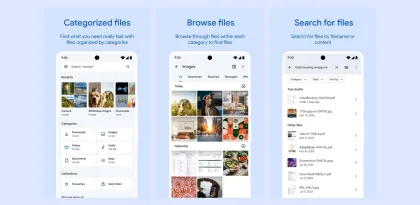

A receipt downloaded to a phone is easy to find until a Windows form asks for the original PDF. Quick Share gives Files by Google a direct route from the Android downloads folder to a nearby PC. The convenience is greatest after the first transfer, once both devices know which other devices to accept.
The first transfer exposes the setup cost
Start with a small file you can easily identify, such as a receipt with a date in its name. Find it in Files by Google and select it through the app's Quick Share controls. On the PC, Google's Windows receiver needs to be installed and discoverable. When both devices use the same Google Account, the receiver can accept transfers automatically. On a shared computer, read the incoming prompt and confirm the device before accepting. Files by Google sharing help · Google's Windows setup guide
The appeal is that you can select the actual file from the same app you use to browse Downloads. That is especially useful when a document exists in several versions. A filename with a date or revision number is easier to trust than a preview that looks identical to three earlier copies.
Finding the receiver is the main point of friction
When a PC doesn't appear, looking through the phone's file picker won't help. First check whether Quick Share is running on Windows and whether its visibility setting includes the sending phone. Google also calls for nearby devices with Bluetooth enabled and a shared network for the Windows workflow. Office Wi-Fi can prevent devices from reaching one another, which matters if you plan to use the feature for work. Google's Windows troubleshooting guide
On a personal laptop, Google's Your devices visibility option makes recurring transfers straightforward with the same account. A borrowed computer requires more coordination. You may need to adjust its visibility temporarily, check the request and then restore its previous setting.
Check the destination before closing the phone
Windows saves incoming files under Downloads in a Quick Share folder. Open the file there before attaching it to a form or moving it into a project folder. When you're sending a batch, check that the expected files all arrived. This is a small step that keeps the handoff from turning into a search through several downloads directories later.
Verdict
Files by Google makes Quick Share useful for small, recurring handoffs between an Android phone and a familiar Windows computer. Its strength is moving a file you already have into the place you need it. The setup pays off when both devices are often nearby. On managed networks or unfamiliar PCs, discovery is the part most likely to slow you down.


