
Arranging Coins and Notes AUD
Rating
Oct 09, 2024Latest update
1.2Version
About Arranging Coins and Notes AUD
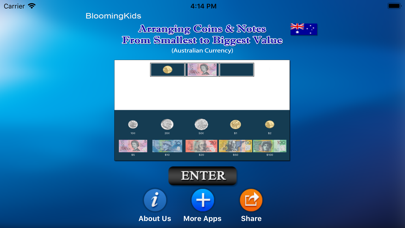
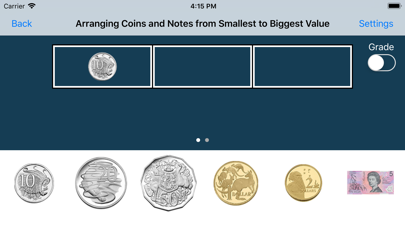
This app helps the student to identify coins and notes and understand the value of each coin or note. A coin or note appears in the first box, and the student is asked to click on the next two coins or notes that follow in ascending order. This program can be used by kindergarten children or learning-disabled (autistic or with other disabilities) children of various ages.
Settings for Arranging Coins and Notes from Smallest to Biggest Value:
“Settings" is located at the bottom left corner of the screen. If the therapist/parent needs to adjust the settings, click the “Settings" to make the settings box disappear or reappear.
Prompt (Blink)
This is checked by default. If the student fails to click the correct coins or notes within ten seconds, the program guides him/her to the correct coin or note by making the coin or note blink. This is available for “Training" mode but disabled for “Test" mode.
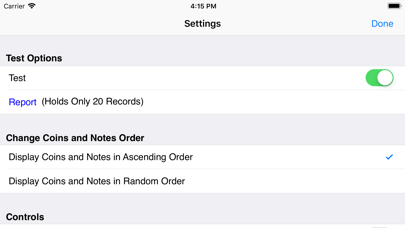
Here, the student can test him/herself. “Prompt" and “Congratulatory Animation" are disabled. The test results are recorded and “Report" becomes enabled.
Prompt(Blink)
This is checked by default. If the student fails to click the correct coins or bills within ten seconds, the program guides him/her to the correct coin or bill by making the coin or bill blink.
Numerical Label under Coin or Note
When this is checked a numerical label appears under each coin or note.
No Label under Coin or Note
When this is checked no label appears under the coins or notes.
Display Coins and Notes in Ascending Order or Random Order
The coins and notes at the bottom of the screen appear in ascending order of value or in random order. This is a toggle switch if the notes and coins are listed in random order, clicking this button will change the display to ascending order, and vice-versa.
Congratulatory Animation
This box is checked by default. This is available only for the “Training" mode. When this is checked, clicking the correct value invites a congratulatory animation. This animation runs for ten seconds. Click anywhere on the screen or press space bar to stop the congratulatory animation.
Uncheck the box if the student doesn't need congratulatory animation.
Done
Click on the “Done" button to close “Arranging Coins and Notes from Smallest to Biggest Value" and return to the main program.
Settings for Arranging Coins and Notes from Smallest to Biggest Value:
“Settings" is located at the bottom left corner of the screen. If the therapist/parent needs to adjust the settings, click the “Settings" to make the settings box disappear or reappear.
Prompt (Blink)
This is checked by default. If the student fails to click the correct coins or notes within ten seconds, the program guides him/her to the correct coin or note by making the coin or note blink. This is available for “Training" mode but disabled for “Test" mode.
Here, the student can test him/herself. “Prompt" and “Congratulatory Animation" are disabled. The test results are recorded and “Report" becomes enabled.
Prompt(Blink)
This is checked by default. If the student fails to click the correct coins or bills within ten seconds, the program guides him/her to the correct coin or bill by making the coin or bill blink.
Numerical Label under Coin or Note
When this is checked a numerical label appears under each coin or note.
No Label under Coin or Note
When this is checked no label appears under the coins or notes.
Display Coins and Notes in Ascending Order or Random Order
The coins and notes at the bottom of the screen appear in ascending order of value or in random order. This is a toggle switch if the notes and coins are listed in random order, clicking this button will change the display to ascending order, and vice-versa.
Congratulatory Animation
This box is checked by default. This is available only for the “Training" mode. When this is checked, clicking the correct value invites a congratulatory animation. This animation runs for ten seconds. Click anywhere on the screen or press space bar to stop the congratulatory animation.
Uncheck the box if the student doesn't need congratulatory animation.
Done
Click on the “Done" button to close “Arranging Coins and Notes from Smallest to Biggest Value" and return to the main program.
Arranging Coins and Notes AUD Screenshots
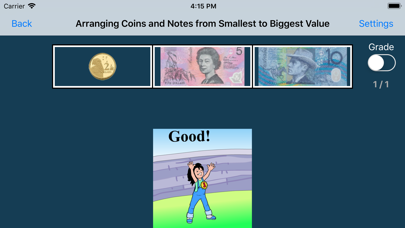
Editor's Recommendation
 Canva: AI Photo & Video Editor
 Proton VPN: Fast & Secure
 Booking.com: Hotels & Travel
 Too Good To Go: End Food Waste
 Waze Navigation & Live Traffic
 Stellarium Mobile - Star Map
 Ticketmaster-Buy, Sell Tickets
 Bolt: Request a Ride
 Life360: Find Friends & Family
 GetYourGuide: Travel & Tickets
 Sky Guide
 Doctolib - Your health partner
Apps Like Arranging Coins and Notes AUD
 Arranging Coins and Notes AUD
 Activity Coins and Notes AUD
 Arranging Coins and Bills CAD
 DIY Flower Arranging for Beginners:Guide and Tips
 Lock The Pig By Arranging The Stones
 How to Flower Arranging - Tips & Tricks
 Arranging Explored For Live 9
 Vocal Production & Arranging
 Arranging Explored in Live 9
 Flower Arranging:Crafting Art Design
 Coins - free puzzle game of coins
 Kingdom Coins Lucky Vegas - Dozer of Coins Arcade Game
Apps by Blooming Kids Software LLC
 Match Money Using Pic (CAD)
 Discriminating Money (CAD)
 Activity Coins and Bills CAD
 Action Matrix
 Discriminating Money (US)
 American Money 1
 Shapes Full App
- Arranging Coins and Bills CAD
- Arranging Coins and Notes AUD
 Finding Missing Number in Subtraction
 Finding Missing Number In Multiplication
 Finding Missing Number in the Division
Arranging Coins and Notes AUD FAQ
How do I download Arranging Coins and Notes AUD from PGYER IPA HUB?
Is the Arranging Coins and Notes AUD on PGYER IPA HUB free to download?
Do I need an account to download Arranging Coins and Notes AUD from PGYER IPA HUB?
How can I report a problem with Arranging Coins and Notes AUD on PGYER IPA HUB?
Did you find this helpfull
Yes
No
Most Popular

ChatGPTIntroducing ChatGPT for iOS: OpenAI’s latest advancements at your fingertips.
This official app is f

Google GeminiThe Google Gemini app is an AI assistant that can help supercharge your creativity and productivity.

Claude by AnthropicGet free access to the newly upgraded Claude 3.5 Sonnet – Anthropic's most advanced model yet. Wheth

GoogleDownload the Google app to stay in the know about things that matter to you. Try AI Overviews, find

CapCut - Video EditorCapCut is a free all-in-one video editing app that helps you create incredible videos.
「Easy to use」

Shop: All your favorite brandsElevate every shopping moment
Shop, track, and explore the latest trends in an all-in-one shopping

Google MapsNavigate your world faster and easier with Google Maps. Over 220 countries and territories mapped an

Uber - Request a rideJoin the millions of riders who trust Uber for their everyday travel needs. Whether you’re running a

ThreadsSay more with Threads — Instagram’s text-based conversation app.
Threads is where communities come t

Gmail - Email by GoogleThe official Gmail app brings the best of Gmail to your iPhone or iPad with robust security, real-ti

TikTokTikTok is THE destination for mobile videos. On TikTok, short-form videos are exciting, spontaneous,

WhatsApp MessengerWhatsApp from Meta is a FREE messaging and video calling app. It’s used by over 2B people in more th

InstagramLittle moments lead to big friendships. Share yours on Instagram.
— From Meta
Connect with friends,

Netflix Game ControllerPlay games on your TV with the Netflix Game Controller.
This app connects to your TV and allows you

AirbnbTHE FASTEST, EASIEST WAY TO AIRBNB
Find inspiration, plan a trip with your group, book it, and go. Y

Telegram MessengerPure instant messaging — simple, fast, secure, and synced across all your devices. One of the top 5

Spotify - Music and PodcastsWith the Spotify music and podcast app, you can play millions of songs, albums and original podcasts

DramawaveDramawave - Stream Endless Drama Shorts, Anytime, Anywhere
Welcome to Dramawave the ultimate destina

Whatnot - Live Video ShoppingWhatnot is a social marketplace where you can discover some of your favorite products like sports ca

Google ChromeDownload the new Google Chrome for your iPhone and iPad. Now more simple, secure and faster than eve

FacebookWhere real people propel your curiosity. Whether you’re thrifting gear, showing a reel to that group

XThe X app is the trusted global digital town square for everyone.
With X, you can:
Post content for

Indeed Job SearchDiscover your next job opportunity on Indeed, the free job search app designed to connect you with b

Duolingo - Language LessonsLearn a new language with the world’s most-downloaded education app! Duolingo is the fun, free app f