

Stop Motion Plus
Rating
Sep 29, 2024Latest update
1.8Version
About Stop Motion Plus
Stop Motion for iOS. Simple and robust stop motion app. Create amazing stop-motion video with ease. Perfect for casual user with easy to use control panel.
Project Management:
• Rename, Delete Project or Export Movie Option on Long Press.
• Project are copyable to other devices by using Files App, go to Stop Motion and copy Project folder.
Stop Motion Plus Camera Features:
• Default highest photo quality output depend on devices.
• Dual Lens or Triple Lens Devices support.
• Auto/Lock White Balance.
• Auto/Touch Focus/Exposure Control.
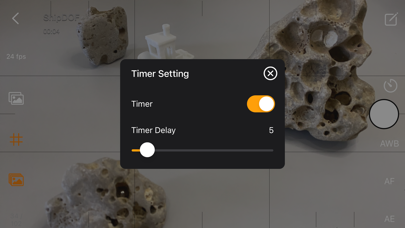
• Timer for interval time capturing range from 1-60 seconds.
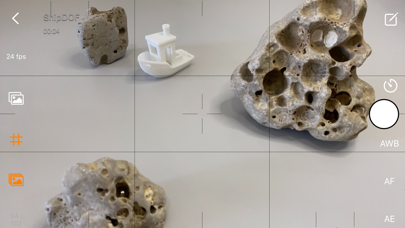
• Show/Hide Grid option.
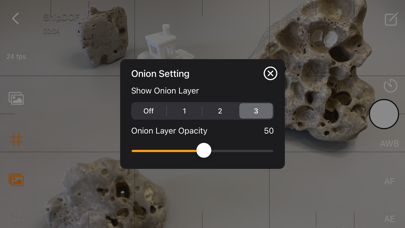
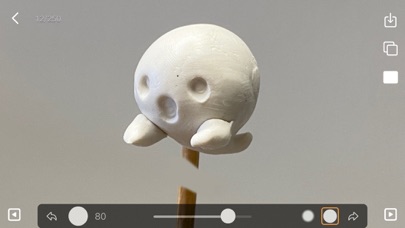
• Option to show onion/overlay previous frames for reference, up to 3 overlay frames.
• Opacity adjustment for onion/overlay frames.
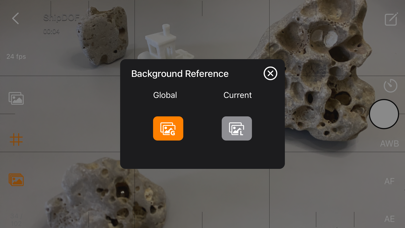
• Capture background reference for object support removal.
• Photo are save immediately so you won't lose data accidentally.
• Photo are save to internal storage and available for external editing [access files via iTunes or Files App].
• Support Voice Control for voice capturing.
• Simple UI and Easy to Use.
Stop Motion Plus Edit Panel Features:
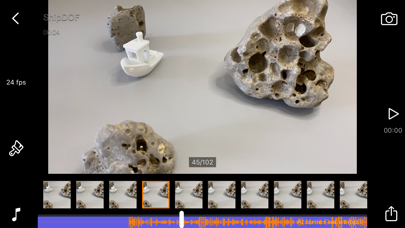
• Able to set movie frame rate FPS from 1-60 fps.
• Edit image by removing supporting structure with background reference.
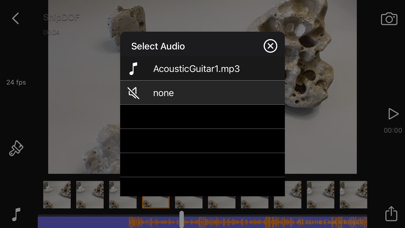
• Add sound into project, sound are place into Files App > Stop Motion > Project Name > Audio folder.
• Preview stop motion animation.
• Switch back/forward between Cam Panel/Edit Panel.
• Select the frame in Edit Panel, switch back to Cam Panel and new capture will be insert after selected frame.
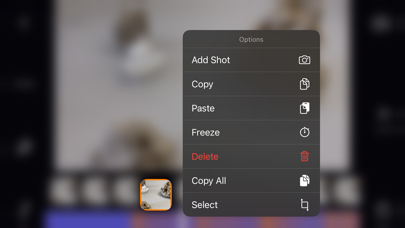
• Long press frame thumbnail to access Copy/Paste/Delete Frame option.
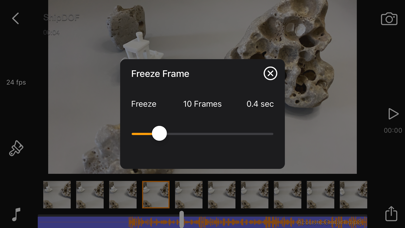
• Add Freeze frame duration for frame delay/pause.
• Copy All Frames/Paste Frames/Paste Inverted Frames.
• Copy Selected Frames/Paste Frames/Paste Inverted Frames.
• Movie info available for better understanding on video length.
Render Panel:
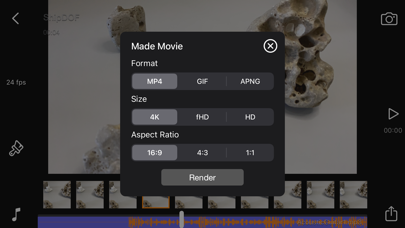
• Video name are same as project title. E.g. Ship.mp4
• Able to set video size from HD, fHD to 4K.
• Able to set video aspect ratio from 16:9, 4:3 or 1:1.
• Able to render output as animated gif or apng.
• Size output for gif/apng are 1280x720, 640x360 or 320x180.
• Video and Animated gif are save into camera roll.
• Animated apng are save into Project Folder.
Quick Start Guide:
- Tap on Create button and give a name.
- Tap on project name to load project.
- Positioning camera and start capture.
- After Finish Capture go to Edit Panel.
- You can set your desire fps and preview.
- Hit render and the video will save into camera roll.
2 type of Background Reference:
Global Reference - for static background scene, only using 1 background image.
Current Reference - for dynamic background scene, each background are capture into single images.
Tips:
• Use overlay image feature as reference to capture object in desire position.
• Use grid for better object positioning.
• Start your project in well lit environment, best is prepare a light source for your scene.
• Use voice control for image capturing if you have a busy hand.
• Capture your project by multiple scene and use iMovie for advanced video editing.
Stop motion is an animated-film making technique in which objects are physically manipulated in small increments between individually photographed frames so that they appear to exhibit independent motion when the series of frames is played back as a fast sequence. Dolls with movable joints or clay figures are often used in stop motion for their ease of repositioning. Stop-motion animation using plasticine figures is called clay animation or "clay-mation". Not all stop motion, however, requires figures or models: stop-motion films can also be made using humans, household appliances, and other objects, usually for comedic effect. Stop motion can also use sequential drawing in a similar manner to traditional animation, such as a flip book. Stop motion using humans is sometimes referred to as pixilation or pixilate animation.
Thanks for your support and do visit nitrio.com for more apps for your iOS devices.
Project Management:
• Rename, Delete Project or Export Movie Option on Long Press.
• Project are copyable to other devices by using Files App, go to Stop Motion and copy Project folder.
Stop Motion Plus Camera Features:
• Default highest photo quality output depend on devices.
• Dual Lens or Triple Lens Devices support.
• Auto/Lock White Balance.
• Auto/Touch Focus/Exposure Control.
• Timer for interval time capturing range from 1-60 seconds.
• Show/Hide Grid option.
• Option to show onion/overlay previous frames for reference, up to 3 overlay frames.
• Opacity adjustment for onion/overlay frames.
• Capture background reference for object support removal.
• Photo are save immediately so you won't lose data accidentally.
• Photo are save to internal storage and available for external editing [access files via iTunes or Files App].
• Support Voice Control for voice capturing.
• Simple UI and Easy to Use.
Stop Motion Plus Edit Panel Features:
• Able to set movie frame rate FPS from 1-60 fps.
• Edit image by removing supporting structure with background reference.
• Add sound into project, sound are place into Files App > Stop Motion > Project Name > Audio folder.
• Preview stop motion animation.
• Switch back/forward between Cam Panel/Edit Panel.
• Select the frame in Edit Panel, switch back to Cam Panel and new capture will be insert after selected frame.
• Long press frame thumbnail to access Copy/Paste/Delete Frame option.
• Add Freeze frame duration for frame delay/pause.
• Copy All Frames/Paste Frames/Paste Inverted Frames.
• Copy Selected Frames/Paste Frames/Paste Inverted Frames.
• Movie info available for better understanding on video length.
Render Panel:
• Video name are same as project title. E.g. Ship.mp4
• Able to set video size from HD, fHD to 4K.
• Able to set video aspect ratio from 16:9, 4:3 or 1:1.
• Able to render output as animated gif or apng.
• Size output for gif/apng are 1280x720, 640x360 or 320x180.
• Video and Animated gif are save into camera roll.
• Animated apng are save into Project Folder.
Quick Start Guide:
- Tap on Create button and give a name.
- Tap on project name to load project.
- Positioning camera and start capture.
- After Finish Capture go to Edit Panel.
- You can set your desire fps and preview.
- Hit render and the video will save into camera roll.
2 type of Background Reference:
Global Reference - for static background scene, only using 1 background image.
Current Reference - for dynamic background scene, each background are capture into single images.
Tips:
• Use overlay image feature as reference to capture object in desire position.
• Use grid for better object positioning.
• Start your project in well lit environment, best is prepare a light source for your scene.
• Use voice control for image capturing if you have a busy hand.
• Capture your project by multiple scene and use iMovie for advanced video editing.
Stop motion is an animated-film making technique in which objects are physically manipulated in small increments between individually photographed frames so that they appear to exhibit independent motion when the series of frames is played back as a fast sequence. Dolls with movable joints or clay figures are often used in stop motion for their ease of repositioning. Stop-motion animation using plasticine figures is called clay animation or "clay-mation". Not all stop motion, however, requires figures or models: stop-motion films can also be made using humans, household appliances, and other objects, usually for comedic effect. Stop motion can also use sequential drawing in a similar manner to traditional animation, such as a flip book. Stop motion using humans is sometimes referred to as pixilation or pixilate animation.
Thanks for your support and do visit nitrio.com for more apps for your iOS devices.
Stop Motion Plus Screenshots
Editor's Recommendation
 Canva: AI Photo & Video Editor
 Proton VPN: Fast & Secure
 Booking.com: Hotels & Travel
 Too Good To Go: End Food Waste
 Waze Navigation & Live Traffic
 Stellarium Mobile - Star Map
 Ticketmaster-Buy, Sell Tickets
 Bolt: Request a Ride
 Life360: Find Friends & Family
 GetYourGuide: Travel & Tickets
 Sky Guide
 Doctolib - Your health partner
Apps Like Stop Motion Plus
 Stop Motion Plus
 Slow Motion & Fast Motion Pro
 VideoMotion: Slow Motion Editor & Fast Motion App
 Video Slomo - Slow motion, Fast motion, Exporter, Speed changer
 Slow Motion & Fast Motion Maker & Slo Mo Video Maker Editor Video Filter Add music to video
 Slow Motion &fast motion-Video Speed Editor,slo-mo
 Live Video - Video editor : Slow motion, Photo slide show, Video trimmer, Add videos to music, Motion editor & Video filter
 Cam Recorder - Slow Motion, Fast Motion, Epic, Lapse, Normal for Instagram,youtube and facebook
 Motion sensor - motion detecting, hidden camera, video surveillance.
 Slow Camera - Real time slow & fast motion high frame camera, and slow & fast motion video editor
 Slow Motion & Fast Motion VCR
 VidSpeed Slow Motion Fast Motion Video Editor Play
Apps by Heng Jia Liang


Most Popular

ChatGPTIntroducing ChatGPT for iOS: OpenAI’s latest advancements at your fingertips.
This official app is f

Google GeminiThe Google Gemini app is an AI assistant that can help supercharge your creativity and productivity.

Claude by AnthropicGet free access to the newly upgraded Claude 3.5 Sonnet – Anthropic's most advanced model yet. Wheth

GoogleDownload the Google app to stay in the know about things that matter to you. Try AI Overviews, find

CapCut - Video EditorCapCut is a free all-in-one video editing app that helps you create incredible videos.
「Easy to use」

Shop: All your favorite brandsElevate every shopping moment
Shop, track, and explore the latest trends in an all-in-one shopping

Google MapsNavigate your world faster and easier with Google Maps. Over 220 countries and territories mapped an

Uber - Request a rideJoin the millions of riders who trust Uber for their everyday travel needs. Whether you’re running a

ThreadsSay more with Threads — Instagram’s text-based conversation app.
Threads is where communities come t

Gmail - Email by GoogleThe official Gmail app brings the best of Gmail to your iPhone or iPad with robust security, real-ti

TikTokTikTok is THE destination for mobile videos. On TikTok, short-form videos are exciting, spontaneous,

WhatsApp MessengerWhatsApp from Meta is a FREE messaging and video calling app. It’s used by over 2B people in more th

InstagramLittle moments lead to big friendships. Share yours on Instagram.
— From Meta
Connect with friends,

Netflix Game ControllerPlay games on your TV with the Netflix Game Controller.
This app connects to your TV and allows you

AirbnbTHE FASTEST, EASIEST WAY TO AIRBNB
Find inspiration, plan a trip with your group, book it, and go. Y

Telegram MessengerPure instant messaging — simple, fast, secure, and synced across all your devices. One of the top 5

Spotify - Music and PodcastsWith the Spotify music and podcast app, you can play millions of songs, albums and original podcasts

DramawaveDramawave - Stream Endless Drama Shorts, Anytime, Anywhere
Welcome to Dramawave the ultimate destina

Whatnot - Live Video ShoppingWhatnot is a social marketplace where you can discover some of your favorite products like sports ca

Google ChromeDownload the new Google Chrome for your iPhone and iPad. Now more simple, secure and faster than eve

FacebookWhere real people propel your curiosity. Whether you’re thrifting gear, showing a reel to that group

XThe X app is the trusted global digital town square for everyone.
With X, you can:
Post content for

Indeed Job SearchDiscover your next job opportunity on Indeed, the free job search app designed to connect you with b

Duolingo - Language LessonsLearn a new language with the world’s most-downloaded education app! Duolingo is the fun, free app f