

DDSA Dictionary of Old Marathi
Rating
Nov 18, 2024Latest update
2.0Version
About DDSA Dictionary of Old Marathi
The Tulpule Dictionary of Old Marathi app is a product of the Digital South Asia Library program (https://dsal.uchicago.edu) at the University of Chicago. The app offers a searchable version of “A Dictionary of Old Marathi,” S.G. Tulpule and A. Feldhaus, eds. Mumbai: Popular Prakashan, 1999.
The Old Marathi dictionary app can be used both online and offline. The online version interacts with a database that runs remotely on a server at the University of Chicago. The offline version uses a database that is created on the device upon first download.
By default, the app operates in the online mode.
The app allows users to conduct both headword and fulltext queries.
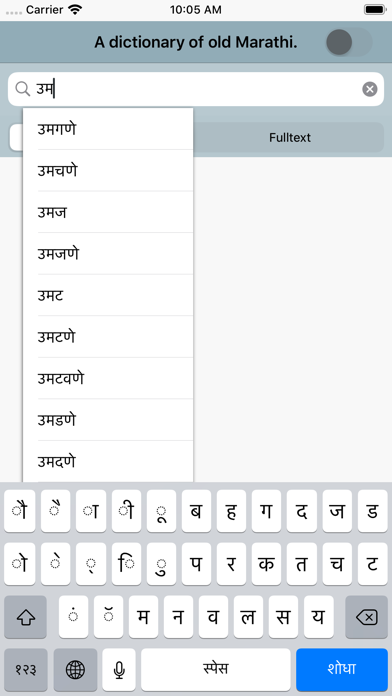
The default mode for this app is to search headwords. To search for a headword, touch the search box at the top (magnifying glass icon) to expose the on-screen keyboard and begin searching. Headwords can be entered in Devanagari, accented latin characters, and unaccented latin characters.
After entering three characters in the search box, a scrollable list of search suggestions will pop up. Touch the word to search for and it will automatically fill in the search field. Or ignore suggestions and enter the search term completely. To execute the search, touch the return button on the keyboard.
By default, headword searches expand off the end of the search term. In other words, searching for "ana" will generate results for headwords that begin with "ana" and have any number of trailing characters, like "aṇa" (अण), "aṇagaṭa" (अणगट), "aṇaṇu" (अणणु), etc. To expand the front of a query, users can enter the "%" character at the beginning of search term. For example, "%ana" will find "akaṇava" (अकणव), "aṅkaṇā" (अंकणा), "akuḷanātha" (अकुळनाथ), etc. The wildcard character at the front of a word also expands search suggestions.
For fulltext searching, select the "Fulltext" search scope button and then enter the search term in the search box at the top.
Fulltext searching supports multiword searching. For example, the search "rice flour" returns 2 results where "rice" and "flour" can be found in the same definition. Multiword searches can be executed with the boolean operators "NOT" and "OR" as well. The search "rice OR flour" returns 80 fulltext results; "rice NOT flour" returns 54 fulltext results.
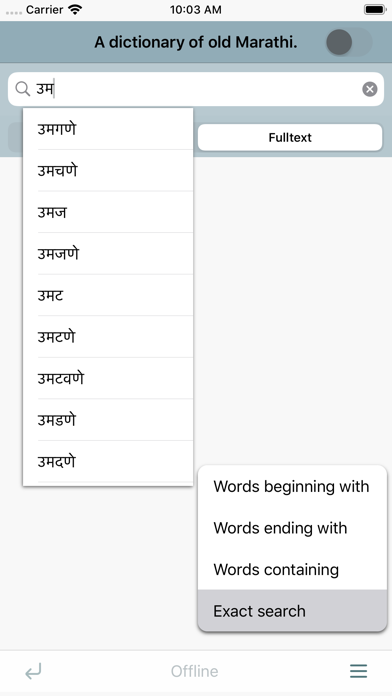
To conduct substring matching, select an option from the "Search Options" sub-menu, enter a string in the search field, and touch return. The default for all searching is "Words beginning with." But for example, selecting "Words ending with," "Search all text," and then entering "scent" as the search string will find 5 examples of words that end in "scent."
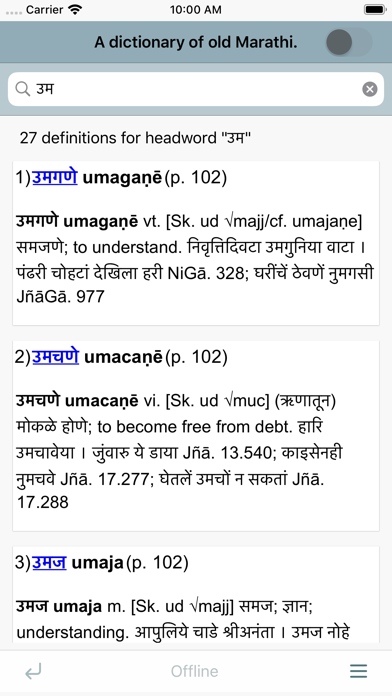
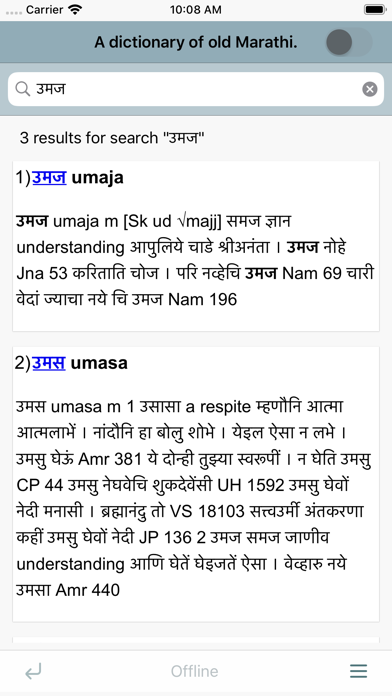
Search results come first in a numbered list that displays the Devanagari headword, the accented latin transliteration of the headword, and a chunk of the definition. To see a full definition, touch the headword.
In online mode, the full result page also has a page number link that the user can click to get the full page context of the definition. Link arrows at the top of the full page allow the user to click to previous and next pages in the dictionary.
To select either online or offline mode, simply toggle the selector at the top of the screen.
Note that on start up, the app will test to see whether the device has an internet connection and the remote server is available. Again, the app operates in online mode by default. The user should select the appropriate mode before conducting a search.
This is a dictionary of the Marathi language in the Old Marathi period. It is meant to be used in conjunction with a dictionary of modern Marathi or by speakers of modern Marathi. Words occurring in the same form and with the same meanings in Old Marathi and modern Marathi have generally not been included in this dictionary. For Old Marathi words not found here, the reader is advised to consult Molesworth's Marathi-English dictionary or another dictionary of modern Marathi.
The Old Marathi dictionary app can be used both online and offline. The online version interacts with a database that runs remotely on a server at the University of Chicago. The offline version uses a database that is created on the device upon first download.
By default, the app operates in the online mode.
The app allows users to conduct both headword and fulltext queries.
The default mode for this app is to search headwords. To search for a headword, touch the search box at the top (magnifying glass icon) to expose the on-screen keyboard and begin searching. Headwords can be entered in Devanagari, accented latin characters, and unaccented latin characters.
After entering three characters in the search box, a scrollable list of search suggestions will pop up. Touch the word to search for and it will automatically fill in the search field. Or ignore suggestions and enter the search term completely. To execute the search, touch the return button on the keyboard.
By default, headword searches expand off the end of the search term. In other words, searching for "ana" will generate results for headwords that begin with "ana" and have any number of trailing characters, like "aṇa" (अण), "aṇagaṭa" (अणगट), "aṇaṇu" (अणणु), etc. To expand the front of a query, users can enter the "%" character at the beginning of search term. For example, "%ana" will find "akaṇava" (अकणव), "aṅkaṇā" (अंकणा), "akuḷanātha" (अकुळनाथ), etc. The wildcard character at the front of a word also expands search suggestions.
For fulltext searching, select the "Fulltext" search scope button and then enter the search term in the search box at the top.
Fulltext searching supports multiword searching. For example, the search "rice flour" returns 2 results where "rice" and "flour" can be found in the same definition. Multiword searches can be executed with the boolean operators "NOT" and "OR" as well. The search "rice OR flour" returns 80 fulltext results; "rice NOT flour" returns 54 fulltext results.
To conduct substring matching, select an option from the "Search Options" sub-menu, enter a string in the search field, and touch return. The default for all searching is "Words beginning with." But for example, selecting "Words ending with," "Search all text," and then entering "scent" as the search string will find 5 examples of words that end in "scent."
Search results come first in a numbered list that displays the Devanagari headword, the accented latin transliteration of the headword, and a chunk of the definition. To see a full definition, touch the headword.
In online mode, the full result page also has a page number link that the user can click to get the full page context of the definition. Link arrows at the top of the full page allow the user to click to previous and next pages in the dictionary.
To select either online or offline mode, simply toggle the selector at the top of the screen.
Note that on start up, the app will test to see whether the device has an internet connection and the remote server is available. Again, the app operates in online mode by default. The user should select the appropriate mode before conducting a search.
This is a dictionary of the Marathi language in the Old Marathi period. It is meant to be used in conjunction with a dictionary of modern Marathi or by speakers of modern Marathi. Words occurring in the same form and with the same meanings in Old Marathi and modern Marathi have generally not been included in this dictionary. For Old Marathi words not found here, the reader is advised to consult Molesworth's Marathi-English dictionary or another dictionary of modern Marathi.
DDSA Dictionary of Old Marathi Screenshots
Editor's Recommendation
 Canva: AI Photo & Video Editor
 Proton VPN: Fast & Secure
 Booking.com: Hotels & Travel
 Too Good To Go: End Food Waste
 Waze Navigation & Live Traffic
 Stellarium Mobile - Star Map
 Ticketmaster-Buy, Sell Tickets
 Bolt: Request a Ride
 Life360: Find Friends & Family
 GetYourGuide: Travel & Tickets
 Sky Guide
 Doctolib - Your health partner
Apps Like DDSA Dictionary of Old Marathi
 DDSA Dictionary of Old Marathi
 DDSA Marathi and English
 DDSA Platts Dictionary
 DDSA Praharaj Oriya dictionary
 DDSA Steingass Dictionary
 Marathi Bible: Easy to Use Bible app in Marathi for daily offline book reading
 Marathi Love Stories - Short Stories in Marathi
 Marathi Keyboard - Marathi Input Keyboard
 Marathi Transliteration Keyboard - Phonetic Typing in Marathi by KeyNounce
 The Moon And The Cap Marathi - Interactive eBook in Marathi for children with puzzles and learning games, Pratham Books
 Marathi Batmya - Marathi News
 Marathi Pride Marathi Editor
Apps by Charles Cooney


DDSA Dictionary of Old Marathi FAQ
How do I download DDSA Dictionary of Old Marathi from PGYER IPA HUB?
Is the DDSA Dictionary of Old Marathi on PGYER IPA HUB free to download?
Do I need an account to download DDSA Dictionary of Old Marathi from PGYER IPA HUB?
How can I report a problem with DDSA Dictionary of Old Marathi on PGYER IPA HUB?
Did you find this helpfull
Yes
No
Most Popular

ChatGPTIntroducing ChatGPT for iOS: OpenAI’s latest advancements at your fingertips.
This official app is f

Google GeminiThe Google Gemini app is an AI assistant that can help supercharge your creativity and productivity.

Claude by AnthropicGet free access to the newly upgraded Claude 3.5 Sonnet – Anthropic's most advanced model yet. Wheth

GoogleDownload the Google app to stay in the know about things that matter to you. Try AI Overviews, find

CapCut - Video EditorCapCut is a free all-in-one video editing app that helps you create incredible videos.
「Easy to use」

Shop: All your favorite brandsElevate every shopping moment
Shop, track, and explore the latest trends in an all-in-one shopping

Google MapsNavigate your world faster and easier with Google Maps. Over 220 countries and territories mapped an

Uber - Request a rideJoin the millions of riders who trust Uber for their everyday travel needs. Whether you’re running a

ThreadsSay more with Threads — Instagram’s text-based conversation app.
Threads is where communities come t

Gmail - Email by GoogleThe official Gmail app brings the best of Gmail to your iPhone or iPad with robust security, real-ti

TikTokTikTok is THE destination for mobile videos. On TikTok, short-form videos are exciting, spontaneous,

WhatsApp MessengerWhatsApp from Meta is a FREE messaging and video calling app. It’s used by over 2B people in more th

InstagramLittle moments lead to big friendships. Share yours on Instagram.
— From Meta
Connect with friends,

Netflix Game ControllerPlay games on your TV with the Netflix Game Controller.
This app connects to your TV and allows you

AirbnbTHE FASTEST, EASIEST WAY TO AIRBNB
Find inspiration, plan a trip with your group, book it, and go. Y

Telegram MessengerPure instant messaging — simple, fast, secure, and synced across all your devices. One of the top 5

Spotify - Music and PodcastsWith the Spotify music and podcast app, you can play millions of songs, albums and original podcasts

DramawaveDramawave - Stream Endless Drama Shorts, Anytime, Anywhere
Welcome to Dramawave the ultimate destina

Whatnot - Live Video ShoppingWhatnot is a social marketplace where you can discover some of your favorite products like sports ca

Google ChromeDownload the new Google Chrome for your iPhone and iPad. Now more simple, secure and faster than eve

FacebookWhere real people propel your curiosity. Whether you’re thrifting gear, showing a reel to that group

XThe X app is the trusted global digital town square for everyone.
With X, you can:
Post content for

Indeed Job SearchDiscover your next job opportunity on Indeed, the free job search app designed to connect you with b

Duolingo - Language LessonsLearn a new language with the world’s most-downloaded education app! Duolingo is the fun, free app f