

Moore et Francais English
Rating
Aug 09, 2024Latest update
2.0Version
About Moore et Francais English
Cette application vous présente la Bible traduite en langue mooré parlée au Burkina Faso.
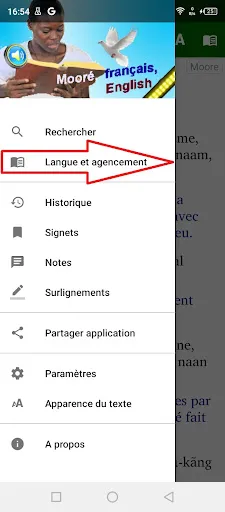
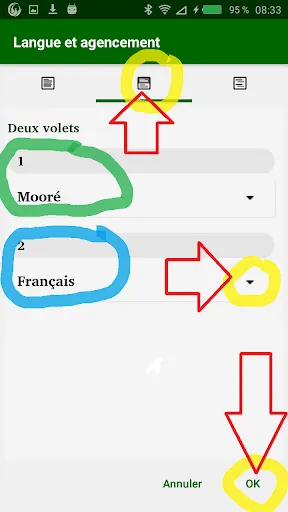
Si vous appuyez sur le petit icône «livre» en haut à droite, vous pouvez changer les fenêtres sur l’écran : Choisissez maintenant soit
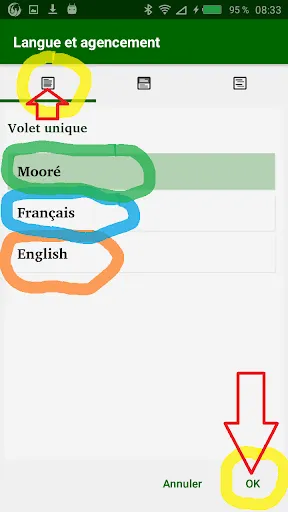
- «volet unique» si vous voulez voir le Mooré uniquement
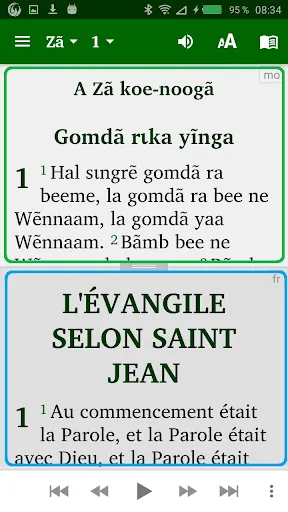
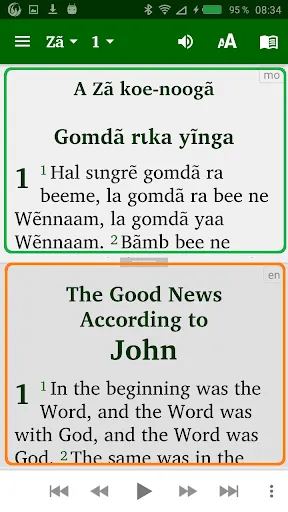
- «deux volets» pour afficher le Mooré en haut et parallèlement la version française ou anglaise en bas
- «verset par verset» pour afficher un verset en Mooré suivi du même verset en français ou en anglais.
• Marquez et mettez en surbrillance vos versets préférés, ajoutez des notes
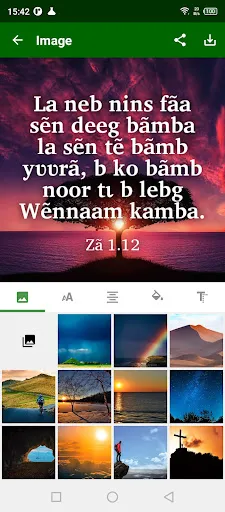
• Lorsque vous appuyez sur un verset, un bouton d'image est affiché sur la barre d'outils inférieure. Lorsque ce bouton est enfoncé, l'écran 'Modifier l'image' apparaît. Vous pouvez choisir l'image d'arrière-plan, déplacer le texte autour de l'image, modifier la police, la taille du texte, l'alignement, le format et la couleur. l'image finale peut être enregistrée sur l'appareil et partagée avec d'autres.
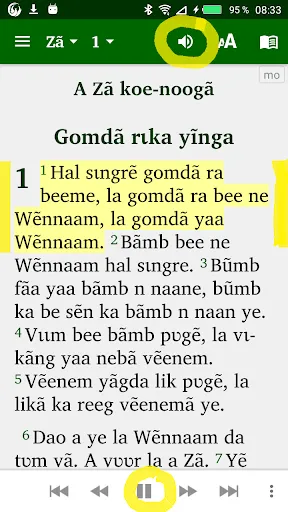
• Donnez la permission à votre téléphone de télécharger les fichiers audio pour les textes du Nouveau Testament. Une fois téléchargées, les fichiers audio resteront sur votre appareil pour réutilisation en mode hors-ligne.
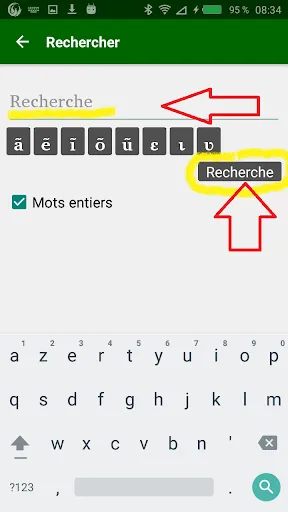
• Recherchez des mots dans votre Bible (c’est une «concordance»).
• Balayez pour parcourir les chapitres
• Mode nuit pour lire dans l'obscurité (bon pour vos yeux)
• Cliquez et partagez des versets bibliques avec vos amis via WhatsApp, Facebook, e-mail, SMS, etc.
• Aucune installation de police supplémentaire requise. (rend bien les scripts complexes.)
• Nouvelle interface utilisateur avec menu de tiroir de navigation
• Taille de police ajustable et interface facile à utiliser
English
If you press the little “book” icon on the top right you can change the windows on the screen: Now choose either
- “single pane” if you want to see the Mooré only
- "two panes" to display the Mooré at the top and the French or English version at the bottom
- "verse by verse" to display a verse in Mooré followed by the same verse in French or in English.
• Bookmark and highlight your favourite verses
• When you tap on a verse, an image button is shown on the bottom toolbar. When this button is pressed, the 'Edit image' screen appears. You can choose the background image, move the text around the image, change the font, text size, alignment, format and colour. the finished image can be saved to the device and shared with others.
• Give your phone permission to download the audio files for the New Testament texts. Once downloaded, the audio files will remain on your device for further use in offline mode.
• Write your personal notes
• Search for words in your Bible
• Swipe to navigate chapters
• Night Mode for reading during when dark (good for your eyes)
• Click and share Bible verses with your friends via WhatsApp, Facebook, E-mail, SMS etc.
• No additional font installation required. (renders complex scripts well.)
• Friendly user interface with Navigation drawer menu
• Adjustable font size and easy to use interface
Si vous appuyez sur le petit icône «livre» en haut à droite, vous pouvez changer les fenêtres sur l’écran : Choisissez maintenant soit
- «volet unique» si vous voulez voir le Mooré uniquement
- «deux volets» pour afficher le Mooré en haut et parallèlement la version française ou anglaise en bas
- «verset par verset» pour afficher un verset en Mooré suivi du même verset en français ou en anglais.
• Marquez et mettez en surbrillance vos versets préférés, ajoutez des notes
• Lorsque vous appuyez sur un verset, un bouton d'image est affiché sur la barre d'outils inférieure. Lorsque ce bouton est enfoncé, l'écran 'Modifier l'image' apparaît. Vous pouvez choisir l'image d'arrière-plan, déplacer le texte autour de l'image, modifier la police, la taille du texte, l'alignement, le format et la couleur. l'image finale peut être enregistrée sur l'appareil et partagée avec d'autres.
• Donnez la permission à votre téléphone de télécharger les fichiers audio pour les textes du Nouveau Testament. Une fois téléchargées, les fichiers audio resteront sur votre appareil pour réutilisation en mode hors-ligne.
• Recherchez des mots dans votre Bible (c’est une «concordance»).
• Balayez pour parcourir les chapitres
• Mode nuit pour lire dans l'obscurité (bon pour vos yeux)
• Cliquez et partagez des versets bibliques avec vos amis via WhatsApp, Facebook, e-mail, SMS, etc.
• Aucune installation de police supplémentaire requise. (rend bien les scripts complexes.)
• Nouvelle interface utilisateur avec menu de tiroir de navigation
• Taille de police ajustable et interface facile à utiliser
English
If you press the little “book” icon on the top right you can change the windows on the screen: Now choose either
- “single pane” if you want to see the Mooré only
- "two panes" to display the Mooré at the top and the French or English version at the bottom
- "verse by verse" to display a verse in Mooré followed by the same verse in French or in English.
• Bookmark and highlight your favourite verses
• When you tap on a verse, an image button is shown on the bottom toolbar. When this button is pressed, the 'Edit image' screen appears. You can choose the background image, move the text around the image, change the font, text size, alignment, format and colour. the finished image can be saved to the device and shared with others.
• Give your phone permission to download the audio files for the New Testament texts. Once downloaded, the audio files will remain on your device for further use in offline mode.
• Write your personal notes
• Search for words in your Bible
• Swipe to navigate chapters
• Night Mode for reading during when dark (good for your eyes)
• Click and share Bible verses with your friends via WhatsApp, Facebook, E-mail, SMS etc.
• No additional font installation required. (renders complex scripts well.)
• Friendly user interface with Navigation drawer menu
• Adjustable font size and easy to use interface
Moore et Francais English Screenshots
Old Versions of Moore et Francais English





Editor's Recommendation


Apps Like Moore et Francais English


Apps by Share the Scriptures


Moore et Francais English FAQ
How do I download Moore et Francais English from PGYER APK HUB?
Is the Moore et Francais English on PGYER APK HUB free to download?
Do I need an account to download Moore et Francais English from PGYER APK HUB?
How can I report a problem with Moore et Francais English on PGYER APK HUB?
Did you find this helpfull
Yes
No
User Reviews
+ Reviews
4.9
5
4
3
2
1
S
Stacey
2025-01-10
18
0
I've tried several language apps, but Moore et Francais English stands out with its unique approach to teaching both Moore and French. Highly recommended!
F
Flta
2024-12-06
20
0
What I love about Moore et Francais English is its ability to make complex language concepts simple. It's perfect for beginners and advanced learners alike.
C
Carol
2025-01-14
2
0
Moore et Francais English is a game-changer in language learning apps. The pronunciation guides and real-life dialogues are particularly helpful.
Most Popular

Hole.io
VOODOO

Super Mario Odyssey
Super Mario Odyssey APK - Explore the World Like Never Before!
Embark on an exhilarating adventure w

Plague Inc.
Ndemic Creations

StarMaker: Sing Karaoke Songs
SKYWORK AI PTE. LTD.

Poppo Live
Poppo Team

CookieRun: OvenBreak
Devsisters Corporation

Netflix
Netflix, Inc.

TikTok
TikTok Pte. Ltd.

Legend of Solgard
Snowprint Studios AB

X
X Corp.

Clash Royale
Supercell

Tips Dream League Soccer 2017
amorphisnguyen

Relic Bag: Shadow Hunter
Fansipan Limited

PUBG MOBILE
Level Infinite

Pure Sniper: Gun Shooter Games
Miniclip.com

War Thunder Mobile
GAIJIN NETWORK LTD

Off Road 4x4 Driving Simulator
Azur Interactive Games Limited

Call of Duty: Warzone Mobile
Activision Publishing, Inc.

GunboundM
DargomStudio

Car Parking Multiplayer 2
olzhass

Talking Pierre the Parrot
Outfit7 Limited

Red Dead redemption 2 Mobile
Tarik EL hamdi

Shadow Fight 2 Special Edition
NEKKI

Reddit
reddit Inc.