
VLC for Android Review: Playback Speed for Recorded Lessons

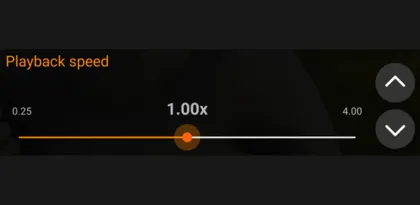

A recorded lesson rarely moves at one comfortable pace. An instructor might spend two minutes setting up a demonstration and then explain the hardest part in twenty seconds. VLC for Android gives local videos both a speed control and a way to jump to a precise time. The two features work best when you use them for different jobs.
Change the speed where the lesson changes
VLC puts playback speed in the video player's additional options. Its slider and adjustment buttons let you move above or below normal speed. For a recording with a long introduction, a modest increase can make it easier to stay with the speaker. Switch back to normal speed before a dense explanation, and slow down further when you need to follow a sequence of actions on screen. VideoLAN video player documentation
The slider is useful when you're setting the pace for a long section. It takes more attention when you change speed every minute. On a small screen, three deliberate choices are easier to manage than constantly hunting for the ideal setting. Try a faster pace for familiar material, normal speed for new ideas and a slower pace for demonstrations you want to follow by hand.
Use timestamps for the moments worth repeating
Speed changes help when a section is generally too slow or too fast. If you missed one instruction, use the player's Jump to time control to return to a known timestamp. A short note such as “08:40, export settings” can save repeated searches through a long recording. This is especially handy when a slow explanation follows a stretch you already know well.
The trade-off is that this workflow takes a moment of preparation. For a one-off clip, dragging the timeline may be enough. For a 45-minute lesson you expect to revisit, a few named timestamps are easier to scan than a stack of similarly shaped thumbnails.
Decide whether speed should carry across files
VideoLAN documents a Save Playback Speed setting that retains the adjusted rate when you change videos. This suits a series from one instructor with a consistent delivery. If you alternate between lectures and films, the retained speed can be a surprise. Leaving that setting off makes new videos start at the normal rate. VideoLAN video settings documentation
Verdict
VLC makes speed adjustment worthwhile for people who work through downloaded lessons and tutorials. The speed control changes the pace of a section, while jumping by time helps with close review. It takes a few more taps than a player with a permanent speed button, but the combination is flexible enough to handle a lesson whose pace changes from one chapter to the next.


